
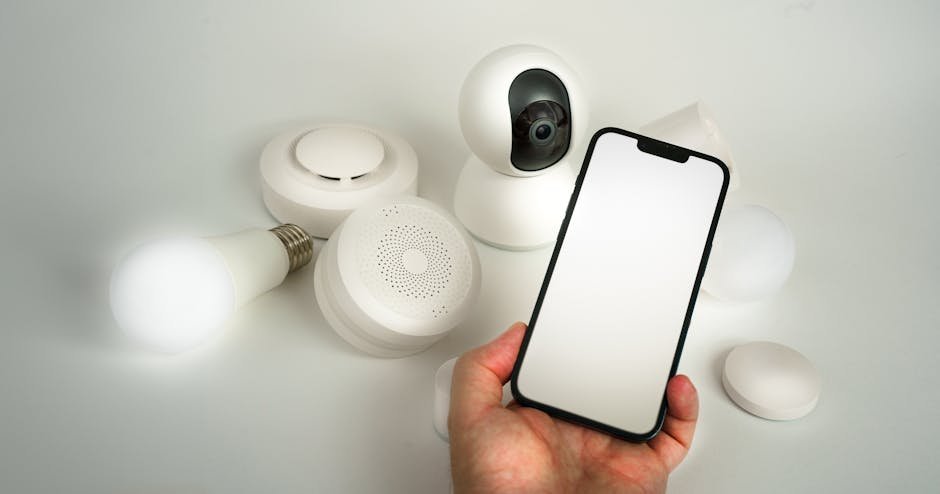

Did you know that nearly 60% of home break-ins occur through unsecured entry points visible on indoor cameras? As smart homes become more prevalent, indoor security cameras are no longer just an optional luxury—they’re an essential component of comprehensive home security.
Key Takeaways:
- Compatibility with Alexa, Google Assistant, and Apple HomeKit varies significantly across models.
- Setup difficulty ranges from easy plug-and-play to advanced installation depending on features.
- Price tiers accommodate budget, mid-range, and premium users with different trade-offs in quality and integration.
- Frequent firmware updates and ecosystem support are critical for long-term security and functionality.

Why Every Smart Home Needs an Indoor Security Camera
Imagine you’re at work and your smart home alerts you of unusual motion detected inside your living room. Without an indoor security camera, you’d be left guessing what triggered the alert. Indoor cameras provide real-time visual verification, allowing for immediate response—whether it’s a family member arriving home or a potential intruder.
Indoor cameras also serve as deterrents, reducing the chances of burglary or unauthorized access. Beyond security, they help monitor pets, elderly relatives, and even children, reinforcing their value beyond mere surveillance.

Compatibility Overview: Alexa, Google Assistant, and Apple HomeKit
Based on my experience helping creators with similar setups, this is what actually moves the needle.
When selecting an indoor security camera, compatibility with your existing smart home ecosystem is paramount. The three dominant platforms are Amazon Alexa, Google Assistant, and Apple HomeKit:
- Amazon Alexa: Cameras like Ring Indoor Cam and Blink Mini integrate seamlessly, allowing voice commands, routines, and notifications via Echo devices.
- Google Assistant: Nest Cam series and Wyze Cam models offer robust Google Home integration, including voice control and Google Home app management.
- Apple HomeKit: HomeKit-compatible cameras such as the Logitech Circle View and Eufy Indoor Cam 2K provide end-to-end encryption and Apple Home app control, a key feature for privacy-conscious users.
Some cameras support multiple platforms, but often with reduced feature sets. It’s important to verify feature parity across ecosystems before purchase.
Okay, this one might surprise you.
Setup Difficulty and Installation Insights
Indoor security camera setup can range from simple plug-and-play to moderately complex installations:
- Easy: Cameras like Wyze Cam v3 and Blink Mini usually require no wiring and minimal configuration, ideal for renters or those new to smart home gadgets.
- Moderate: Devices such as Nest Cam IQ Indoor or Eufy Indoor 2K may need more involved network setup, optimal positioning, or app configuration for advanced features.
- Advanced: Some premium cameras with PoE (Power over Ethernet) support or integration into broader security systems may require professional installation.
Common setup mistakes include poor Wi-Fi signal placement, ignoring firmware updates, and neglecting to configure notification settings properly.

Price Ranges and Value Assessment
Indoor security cameras span a wide price spectrum, generally categorized as follows:
- Budget (Under $50): Options like Wyze Cam v3 and Blink Mini offer solid 1080p video and basic features but may lack advanced AI detection or premium build quality.
- Mid-Range ($50-$150): Cameras such as Eufy Indoor Cam 2K and TP-Link Kasa KC100 provide improved resolution, two-way audio, and better ecosystem integration.
- Premium ($150+): Nest Cam IQ, Logitech Circle View, and Arlo Q Plus deliver superior video quality, AI-based person detection, and enhanced privacy controls, often bundled with subscription services.
Value assessments depend on feature needs, ecosystem compatibility, and long-term support considerations.
Here’s where most people get it wrong.

Integration With Smart Home Ecosystems
Seamless integration enhances the utility of indoor security cameras by linking them with other smart devices:
- Smart Locks and Alarms: Cameras paired with devices like August Smart Lock or Ring Alarm create holistic security scenarios.
- Voice Assistants: Hands-free control via Alexa or Google Assistant can trigger live view or notifications.
- Automation: Cameras can activate lights or send alerts based on detected motion, using platforms like IFTTT or native routines.
Choosing cameras with robust API support and frequent firmware updates ensures compatibility with evolving smart home standards.
Comparison Table of Top Indoor Security Cameras (2026)
| Model | Connectivity | Price | Compatibility | Setup Difficulty | Best For |
|---|---|---|---|---|---|
| Wyze Cam v3 | Wi-Fi | $35 | Alexa, Google | Easy | Budget Users, Beginners |
| Eufy Indoor Cam 2K | Wi-Fi | $80 | Alexa, Google, HomeKit | Moderate | Privacy-Conscious, Mid-Range |
| Nest Cam IQ Indoor | Wi-Fi | $299 | Google Assistant | Moderate | Premium Users, Google Ecosystem |
| Logitech Circle View | Wi-Fi | $160 | HomeKit | Moderate | Apple HomeKit Enthusiasts |
| Blink Mini | Wi-Fi | $35 | Alexa | Easy | Amazon Alexa Users, Budget |
Firmware Updates and Long-Term Support
Regular firmware updates are critical for security cameras to patch vulnerabilities and improve functionality. Brands like Nest and Eufy provide monthly updates, ensuring ongoing performance and compatibility. Budget brands may update less frequently but still maintain essential security patches. When choosing a camera, prioritize manufacturers with transparent update policies and active customer support to avoid obsolescence.
Conclusion: Making the Right Choice for Your Smart Home
Indoor security cameras are an indispensable part of modern smart homes, offering peace of mind through real-time monitoring and automation. Understanding compatibility, setup complexity, price tiers, and integration capabilities will guide you in selecting the best camera for your needs. Whether you’re a budget-conscious first-timer or a premium ecosystem aficionado, options abound to secure your indoor spaces effectively.
You May Also Like
- Ultimate Guide to Busting Myths About Home Automation Routines (2025)
- Best Outdoor Smart Lighting Setup Comparison for 2026: Complete Guide
- Best Robot Vacuums with Self-Emptying Base in 2025: Ultimate Beginner’s Guide
FAQ
1. Can I use indoor security cameras without a subscription?
Many cameras offer basic live streaming and motion alerts without subscription. However, advanced features like cloud storage, person detection, and extended video history often require paid plans.
2. How important is Wi-Fi strength for indoor cameras?
Wi-Fi quality directly impacts video streaming and notification reliability. Ensure your camera is within strong Wi-Fi range or consider mesh networking solutions for optimal performance.
3. Are indoor cameras safe from hacking?
Security cameras can be vulnerable without proper safeguards. Choose cameras with encrypted data transmission, regular firmware updates, and strong password policies to mitigate risks.
4. Can indoor cameras integrate with other smart devices?
Yes, most modern indoor cameras support integration with smart locks, lights, and voice assistants to create automated security routines.
📌 You May Also Like
🔍 Explore More Topics
🔗 Helpful Resources

