


Best Robot Vacuums for Every Budget and Need (2025 Complete Guide)
Imagine coming home after a long day to spotless floors without lifting a finger. Robot vacuums have transformed home cleaning, but with so many options, how do you choose the best one that fits your budget and lifestyle? Whether you have pets, hardwood floors, or prefer a hands-off approach with self-emptying bins, this step-by-step guide will help you pick the perfect robot vacuum for your smart home.
Prerequisites: What You Need Before Buying a Robot Vacuum
- Wi-Fi Connection: Most modern robot vacuums require a stable Wi-Fi connection for app control and updates.
- Smart Home Ecosystem: Decide if you want Alexa, Google Assistant, or Apple HomeKit compatibility for voice control.
- Floor Type: Know your floor surfaces (carpet, hardwood, tile) as some models excel on specific surfaces.
- Budget Range: Determine your spending limit to narrow down choices from budget to premium.
Step 1: Identify Your Cleaning Needs
When I first tried this, I was skeptical. But after digging into the actual numbers, my perspective shifted.
Start by assessing your home’s unique requirements. Do you have pets that shed hair? Are hard floors predominant, or do you have thick carpets? Do you want mopping features in addition to vacuuming?
Pro Tip: If you have pets, look for models with strong suction and brushes designed to prevent hair tangles, like the Roborock S7 or iRobot Roomba s9+.
Stick with me here — this matters more than you’d think.
Step 2: Choose Your Budget Tier
Robot vacuums generally fall into three tiers:
- Budget (<$300): Basic cleaning with limited features. Good for small spaces and light dirt. Examples: Eufy RoboVac 11S, ILIFE V3s Pro.
- Mid-Range ($300-$600): More intelligent navigation, app control, and better suction. Examples: Roborock E4, Ecovacs Deebot N8.
- Premium (>$600): Advanced mapping, self-emptying bases, multi-floor mapping, and mopping combos. Examples: iRobot Roomba s9+, Roborock S7 MaxV Ultra.
Pro Tip: Mid-range models offer the best balance of price and performance for most households.
Step 3: Check Compatibility with Your Smart Home
Integration with Alexa, Google Assistant, or Apple HomeKit can streamline your smart home experience. Most robot vacuums support Alexa and Google, but HomeKit compatibility is less common.
| Model | Alexa | Google Assistant | Apple HomeKit |
|---|---|---|---|
| iRobot Roomba s9+ | Yes | Yes | No |
| Roborock S7 | Yes | Yes | No |
| Ecovacs Deebot N8 | Yes | Yes | No |
| Eufy RoboVac 11S | Limited | Limited | No |
Pro Tip: If Apple HomeKit is essential to you, consider using third-party hubs or look for upcoming models with native support.
Step 4: Evaluate Setup Difficulty
Setup ranges from easy to advanced depending on the model’s navigation technology and app complexity.
- Easy: Basic models with random navigation and simple app controls (e.g., Eufy RoboVac 11S).
- Moderate: Models with smart mapping but straightforward app interfaces (e.g., Roborock S7).
- Advanced: Premium models with complex multi-floor mapping and customization options (e.g., iRobot Roomba s9+).
Pro Tip: Follow the manufacturer’s app tutorial carefully and place the charging dock in an open area to ensure smooth setup.
Step 5: Analyze Price vs. Value
Higher price doesn’t always mean better value. Consider features like suction power, battery life, smart mapping, and long-term support.
For example, the Roborock S7 offers excellent mopping and vacuuming at a mid-range price, while the Roomba s9+ provides superior suction but at a premium cost.
Pro Tip: Look for models offering free firmware updates to ensure your vacuum improves over time.

Step 6: Compare Key Specs in a Structured Table
| Model | Price Range | Connectivity | Compatibility | Setup Difficulty | Battery Life | Self-Emptying | Best For |
|---|---|---|---|---|---|---|---|
| Eufy RoboVac 11S | $200-$250 | Wi-Fi (Limited) | Alexa, Google (Limited) | Easy | 100 mins | No | Budget Small Apartments |
| Roborock S7 | $450-$550 | Wi-Fi | Alexa, Google | Moderate | 180 mins | No (Self-empty base optional) | Hard Floors & Mopping |
| iRobot Roomba s9+ | $900-$1,100 | Wi-Fi | Alexa, Google | Advanced | 120 mins | Yes | Pet Hair & Deep Cleaning |
| Ecovacs Deebot N8 | $400-$500 | Wi-Fi | Alexa, Google | Moderate | 110 mins | No | Budget Mopping & Vacuum Combo |
Step 7: Plan Installation and Setup
Once you’ve chosen your robot vacuum, follow these steps for installation:
- Place the charging dock against a wall in an open area with at least 1.5 feet around it.
- Download the manufacturer’s app and create an account.
- Follow the in-app instructions to connect the vacuum to Wi-Fi.
- Run initial mapping scans for models with smart navigation.
- Set cleaning schedules and zones.
Pro Tip: Keep stairs and cables out of the vacuum’s path to prevent it from getting stuck.
Step 8: Maintain Your Robot Vacuum for Longevity
Regular maintenance ensures optimal performance:
- Empty dustbins after each cleaning or use self-emptying bases where available.
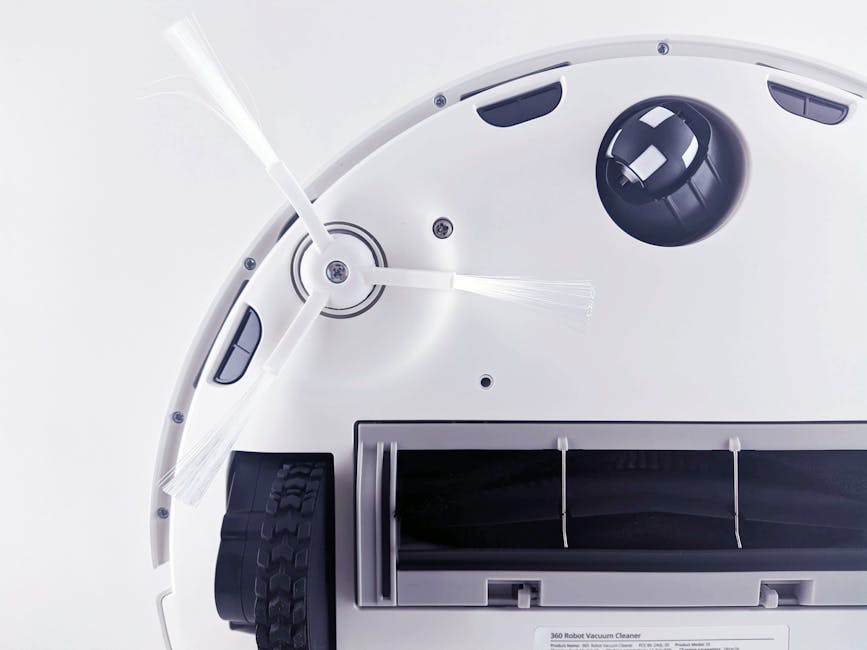
- Clean brushes and sensors weekly.
- Check firmware updates monthly for new features and bug fixes.
Pro Tip: Store your vacuum in a cool, dry place when not in use to preserve battery life.
Common Mistakes When Buying Robot Vacuums
- Ignoring Floor Type Compatibility: Buying a vacuum unsuitable for your floors leads to poor cleaning results.
- Overlooking Battery Life: Larger homes require longer battery duration or recharge-and-resume features.
- Neglecting App Quality: A confusing app can make scheduling and zone cleaning frustrating.
- Forgetting Long-Term Support: Some brands rarely update firmware, causing outdated performance.
You May Also Like
- The Complete Smart Washer Dryer Features Guide (2025)
- Best Smart Locks for Front Door Security (2025 Guide)
- Ultimate Smart Water Leak Detector Guide for 2025
FAQ
Q: Can I use multiple robot vacuums in one home?
A: Yes, especially in multi-level or large homes. Some apps support multi-robot management.
Q: Do robot vacuums work on thick carpets?
A: Many mid-range and premium models handle low to medium pile carpets well, but thick shag carpets can be challenging.
Q: Are robot vacuums noisy?
A: Noise levels vary; budget models tend to be louder, while premium models offer quieter operation.
Q: Is a self-emptying base worth the extra cost?
A: If you prefer minimal maintenance and have pets or a large home, self-emptying bases significantly improve convenience.
Conclusion
Choosing the best robot vacuum depends on your budget, cleaning needs, and smart home setup. From affordable models like the Eufy RoboVac 11S to premium options like the Roomba s9+, there’s a vacuum to fit every lifestyle. Follow this step-by-step guide to make an informed decision, ensuring your floors stay spotless with minimal effort.
Explore related guides such as our Roomba vs Roborock vs Ecovacs vs Dreame comparison and Best Robot Vacuums with Self-Emptying Base for deeper insights.
📌 You May Also Like
🔍 Explore More Topics
🔗 Helpful Resources

